 Must be a trend. Two weeks in a row, the New York Times Week in Review on page two had a story of a geospatial nature. This time the short piece, by Steve Friess, discusses the mapping technologies used to find the millionaire Steve Fossett who went missing in northern Nevada on September 3.
Through the use of high resolution photos donated by Google (the image above notwithstanding) and the use of Amazon Mechanical Turk, arm chair searchers are voluntarily viewing orthophotos to decipher any on the ground clues as to Fossett's whereabouts.
Sunday, September 16, 2007
Collaborative, Distributive Searches for Lost People


Friday, September 14, 2007
National Historical Census Data
 I haven't mentioned the National Historical GIS data base before here, but I used it recently and found it very easy to navigate and I know that there are loads of people out there who want to use old census data for mapping purposes.
First off, here's what the site says about itself: "The National Historical Geographic Information System (NHGIS) provides, free of charge, aggregate census data and GIS-compatible boundary files for the United States between 1790 and 2000."
By providing your email address, you can get boundary files and data for all years that U.S. Census has been performed.
Here's a cool thing I found out, if you made a search for a particular set of data for a certain geography, you can go back and review your Extract History (because you've given your email address) shown in the red circle below. Even if you made your search a year ago, it'll be in the Extract History:

And then you can change either the Geography or the Data tables and make a new search/data extraction. This saves a lot of time plus you do not need to remember which data tables you got when you want to compare two or more geographies for the same time period.

The data available are quite interesting. How people were categorized in the past is pretty different than today, as we know. I believe this site has been up awhile but it is worth mentioning it. The data go down to the tract level, so make note on that. You won't really be able to locate an Irish neighborhood but this is still a very useful resource.
Upgrade to Google Earth 4.2 and See the Sky
I haven't had time to really explore the newest update to Google Earth but I hear it has some new, fun, educational (!) features like stars. Learn about it by watching a Google-made video talking about how to explore the sky.
Thursday, September 13, 2007
Fun Mapping Game for Kids of All Ages - Statetris
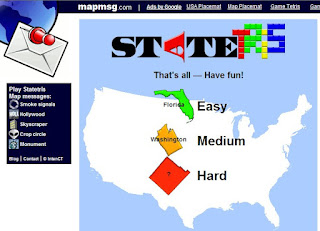
Like Tetris only with states dropping down (from Canada?), Statris USA is a lot of fun for teaching/learning where the US states are. Thank you, Diana Sinton for the tip. Other countries/continents available:
Found at Mapperz: The Mapping News Blog
Tuesday, September 11, 2007
Is Web 3.0 the Geoweb?
 It's no secret that I adore Google Earth. What's not to love? Its nice to know that this blog is at the forefront of discussing the new frontier...Web 3.0..or the geoweb. Who knew?! Here's another piece on the virtues of virtual globes.
The Economist has a terrific piece about the proliferation of geospatially-related data and web browsers and web apps that make the geoweb something we all can do and access. Hopefully you'll be able to read it for free. Thank you Ogle Earth for highlighting this. Much like "Google Maps is Changing the What We See the World," mentioned earlier here, we are seeing the democratization of spatial data. "It's turning into a map of historical significance," says John Hanke, head of Google's Earth and Maps division, and another of Keyhole's founders. "It is going to be a map of the world that is more detailed than any map that's ever been created."

What seems to be happening organically is the creation of maps by anyone who has a computer, a web browser and an idea. NASA World Wind, ESRI's ArcGIS Explorer, Google Earth and Microsoft's Virtual Earth offer free mapping utilities that are easy to use, mostly cross-platform, rich with data, and did I say: easy to use!? The Economist mentions that these "neogeographers" have crossed into the realm of GIS. GIS is "the fancy software tools that are used by governments and companies to analyse spatial data." Yes, right, and GIS software costs money, is hard to use, is not intuitive, the data require regular updates to stay "fresh," and can only be used on a Windows machine. (note to Google: Please buy ESRI.)
 I was interested in reading about the consultant who built 3D models of 13 to-scale of U.S. Air Force bases viewable in World Wind. This is an example of the government using virtual globes and saving money. When I worked in consulting, we did a project in 1996 where we needed geospatial data for New York and New Jersey in an effort to find suitable on-land dump sites for dredged sediments from the New York/New Jersey Harbor. Finding data was like pulling teeth. It certainly wasn't free and we definitely didn't have a free geobrowser to help us figure out our problem. We never found any good sites, as you can imagine. But I'm glad this consultant decided to use a virtual globe rather than Second Life to make these base models.
 One last thing, the piece talks a lot about how the access to free data changes the way we think about how we use the tools. Yes, we worry about security and what the bad guys can see in a virtual globe, but can't the bad guys see that stuff already? The playing field is leveled. The example of the Canary Island providing high-resolution aerial photography to Google to lure tourists reminds me of the Grateful Dead's approach to fans who taped their shows...they not only allowed it, the Dead encouraged it by making a "tapers section" thus creating a marketing strategy that encourages more people to enjoy the music (or the Canary Islands virtually) so that maybe they'll come to more shows and buy records (or fly to the Canary Islands and stay in a hotel.)
Monday, September 10, 2007
Mapping Environmental Changes
 The New York Time's Week in Review had an interesting short piece by Andrew Revkin on creating atlases and how those, because of severe climate changes, need to updated more frequently. He mentions the Aral Sea in Central Asia (above) as an example of a measurable change in water level over a relatively short period of time. The color image is way more revealing than the black and white image in my newspaper. Says Revkin, "All of this means a lot more work for atlas makers, who now have to keep up not only with political change, but also with large-scale effects of people on the home planet."

 The Aral Sea, of course, is a well-known example of obvious and catastrophic climate change and I showed this to my Earth Science class this summer using Google Earth. Check out the Water Cycle placemarks I put together and add some of your own examples of climate change.
 Thursday, September 06, 2007
Latest Earthquake Data in KML
 As stated in Ogle Earth, "Google Earth's built-in Earthquake layer doesn't show earthquakes unless you zoom in real close," you can get nearly real-time earthquake data from the USGS(within 30 minutes of an event) in KML.
Michael Goodchild on "Geography Prospers from GIS"
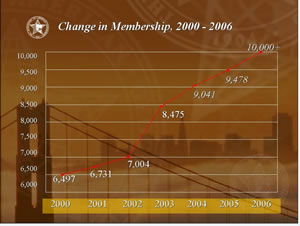 I must have missed mentioning this great turn of events back in April of this year. Michael Goodchild of U.C. Santa Barbara discusses in ESRI's ArcWatch how geography departments across the country are flourishing as a result of the attraction of GIS. Vassar College is no exception on this front as our geography major numbers continue to rise.
"These are good time for the discipline of geography." Check it out if you haven't already.
Wednesday, August 29, 2007
Google Earth, Google Maps, Second Life and First Life
Back into the academic fold and catching up on a little geospatial reading materials, I find a couple of interesting pieces that I’d like to comment on and encourage anyone to take a look at. There will be more as I sift through all the Ogle Earth’s entries that I’ve missed, so I’ll slip off the summer gear and step into serious work mode.

I once had an idea about Google Earth. I had gotten so into using Google Earth that I wanted to write an Op-Ed piece about its use and overwhelming popularity. I’m not so much a techy, geek-type and I thought I could write a coherent piece that could be interesting and understandable to regular folks from age six to 106. Well, like many things, I never got around to it.
I once had an idea about Google Earth. I had gotten so into using Google Earth that I wanted to write an Op-Ed piece about its use and overwhelming popularity. I’m not so much a techy, geek-type and I thought I could write a coherent piece that could be interesting and understandable to regular folks from age six to 106. Well, like many things, I never got around to it.
Two articles that came out at nearly the same time in July, a piece in Wired and another in Technology Review, attempt to explain the wonderful workings of Google Earth (and Google Maps) and Google Earth (and Second Life). These essays are not what I had in mind with my Op-Ed fantasy, but they do go far to explain some of the interesting notions that come up concerning Google Earth.
In "Google Maps is Changing the Way We see the World," Evan Ratliff gives a terrific overview article on not only Google Maps but Google Earth. (I guess that in the on-line world, the writer doesn’t get to write the headline just as in the print world!)
Ratliff answers some frequently asked questions like:
1. What is KML?
2. Why "Earth"?
3. Does Google 'smudge' the sensitive locations?
Read the article to find out the answers.
I cannot agree more with Ratliff’s point that these on-line map services put the power of maps into the hands of non-specialists thus changing what gets mapped, from what scientists find useful to what everyone else finds useful. Sometimes these data overlap, often they don’t, and we move closer to the democratization of geospatial data.

"Second Earth," by Wade Roush in Technology Review takes my beloved Google Earth a step further. He wants to squeeze avatars into Google Earth, or better yet, he wants to recreate Earth in Second Life. This is a noble idea, one that I have stated to my colleagues here at Vassar before (well, the first idea, not the second), but as we all know, the co-mingling of Google Earth and Second Life is not to be happening anytime soon. But the prospect of merging geospatial technologies and virtual worlds is titillating and compelling, especially in the realm of higher education. (The image above is taken from Unype's web site).
With loads of interesting little bits about this and that related to Second Life, this essay is well-worth reading, though a little over-long. But when Roush tells us that “if you take a few months to explore Second Life” you’ll be hooked, I'm thinking that he's been drinking the kool-aid. He also describes Second Life as "beautiful." I read this and I smirk. I'm partial to this life's beauty and I suppose I'm one of the Second Life skeptics. I think that the best thing about Second Life is the notion that we could one day take our little self-representations that we so painstakingly create and breeze them into the First Life. It is lost on me why NOAA would want to bring real-time weather data into Second Life for true, real-world locations, when it is so much more, well, REAL in Google Earth. Why re-create topography and aerial photography when the real thing is already available? Why re-create Machu Picchu when you can see it now in Google Earth? And Google’s server farms make the viewing experience a giddy joy.
So, I read the whole article, hoping to get clued into the mythic allure that is Second Life. What I found is what I already know. There are people who LOVE Second Life and know in their hearts that the personal connections made in an on-line sim environment are very appealing, perhaps life-changing. Second Life is an "eternal garden party" in an unreal, yet altogether not unattractive space. Google Earth, with 250 million downloads, is hugely more popular on so many levels, but primarily because of its ease of use. There is nothing intimidating about using Google Earth and no one will come up to you in Google Earth and pinch you or drop a smoke bomb on your head. And please do read the article, but something missing (pointed out by Brownian Emotion blog) is the why do an integration at all question, even if it could be done?

Neither Google nor Linden Labs (Second Life's creators) have any plan to merge their two cool web apps, unless there’s something they’re not telling us. And the only thing possible at the present that comes close to what Roush is looking for is Unype, and we already know about that too.
I guess the long and the short of it is that I should re-think my Op-Ed idea. I haven’t been scooped yet. Maybe over October Break!
Tuesday, August 28, 2007
Tablet Toolbar for ArcGIS 9.2
Using the Tablet toolbar for digitizing is great for use with a tablet PC, but it's also fine with a desktop PC. Get the tool by going to View -> Toolbars -> Tablet
With the Windows desktop version of ArcGIS 9.2, we found that we could not digitize like we could with the Windows Tablet PC version of ArcGIS. Here's how to make sure you can use this great digitizing tool.

Using the Tablet tools Ink Settings button (circled in green above) you'll get the window shown below.

Make sure you check every box that you can check (especially "Render Ink Graphics as lines when projecting on-the-fly in ArcMap). Also, move the delay time to mid-way on the scale bar like it shows in the screenshot above.
If you are not familiar with how to digitize using a tablet PC or how to use the Tablet toolbar in general, please see a short tutorial I wrote up for a ArcGIS 9.1. If you scroll to page 7 or look for the text "Using the Tablet Pen as a Digitizer," there's a description to help you get started.
Tuesday, August 21, 2007
Weather and GIS From her first post in her new position at the University of Redlands, we learn from Diana Sinton about a cool web page with loads of national weather data...NOAA's National Weather Service.
 Plus, this is my first post of the semester. Yikes, is summer over already!!??
Subscribe to:
Posts (Atom)


